BLURRR
This is a very simple action to master.
Insert your Text or Image and position it to the place where you want it to appear. Highlight and Right click (or Ctrl+C) and Edit -> Paste (Ctrl_V) to duplicate it. This will assure that it will remain after the blurring effect
BLUR: Click Add Effect -> Blur and the below popup will appear.
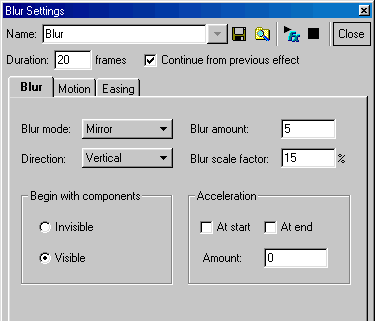
As you can see there are 2 options. Blur Mode & Direction.
Experiment with all of the options to see what happens.
The ZOOM action has been discussed in previous tutorials. The new addition is SLIDE IN: This one is as easy to understand as the current topic.
Download blur.swi to view the parameters...
DOWNLOAD blur.swi
< ZOOM out | INTRO | FONTZOOM | NEXT >

|